Dashboard
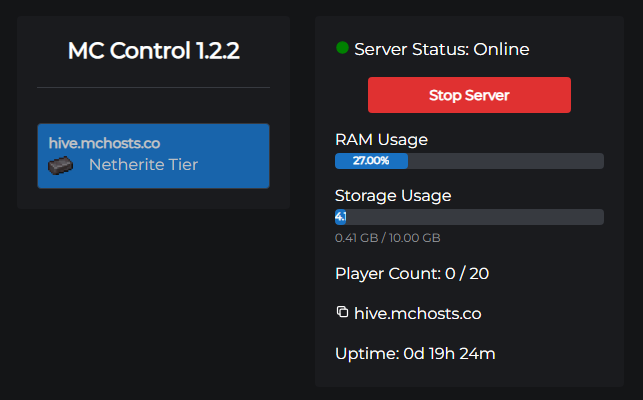
The Dashboard is the first tab you see in the control panel. It gives you a live overview of your server's health and lets you start or stop it.
Start / Stop
The large button in the top-left of the dashboard controls whether your Minecraft server process is running.
- Blue - Start Server: the server is currently offline. Click to start it.
- Red - Stop Server: the server is currently online. Click to stop it gracefully (sends the
stopcommand to Minecraft, which saves the world before shutting down).
The server typically takes 1–2 minutes to start and 5–15 seconds to stop. Watch the Console tab to follow progress in real time.
Server address
Your permanent server address is displayed here. Click the copy icon to copy it to your clipboard - a "Copied Successfully!" notification confirms it was copied.
Share this address with your players. It never changes unless you set up a custom domain.
RAM usage
A live progress bar showing what percentage of your plan's allocated RAM is currently in use by the Minecraft JVM.
High RAM usage (consistently above 90%) can cause lag or crashes. Consider:
- Reducing the number of active plugins or mods
- Lowering the view distance in Gameplay Settings
- Upgrading to a higher plan
Storage usage
Shows how much disk space is currently used vs. your plan's total allocation (e.g. 3.42 GB / 10 GB).
Local backups count toward this total. If you're running low, consider deleting old backups or switching to off-site backups.
Player count
A live count of how many players are currently connected to your server (e.g. 3 / 20). Updated every few seconds via a Minecraft status ping.
Shows 0 / 20 (or similar) when the server is online but empty. Shows nothing if the server is offline.
Uptime
How long the server process has been running since it last started, displayed as days, hours, and minutes (e.g. 2d 4h 31m). Resets to zero on each restart.