Crash Alerts & Offline Notifications
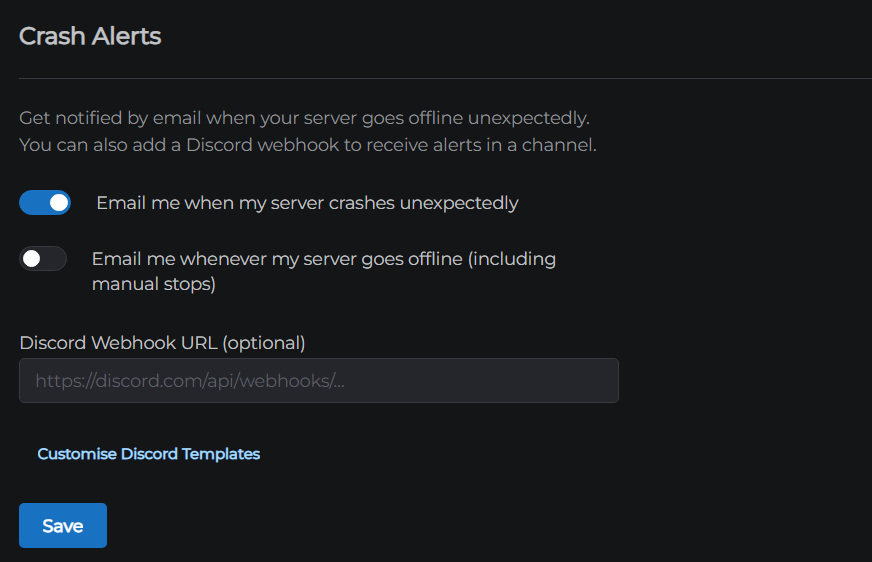
MCHosts can send you an email or a Discord message when your server goes offline unexpectedly, so you know about it even when you are not in the control panel.
How to set it up
- Open the control panel
- Click the Connections tab
- Click Crash Alerts to expand the section
- Turn on the alerts you want (see below)
- Click Save
Alert types
There are two separate alerts you can turn on independently:
| Alert | When it fires |
|---|---|
| Email me when my server crashes unexpectedly | Fires when your server stops due to a crash or an out-of-memory error - not when you stop it yourself |
| Email me whenever my server goes offline | Fires on any offline event, including manual stops and scheduled restarts |
Most people only want the first one. The second is useful if you want a log of every time your server goes down, for any reason.
Discord notifications (optional)
You can also send alerts to a Discord channel using a webhook.
Step 1 - Create a webhook in Discord
- Open Discord and go to the channel where you want alerts to appear
- Click the gear icon next to the channel name to open Edit Channel
- Click Integrations, then Webhooks
- Click New Webhook, give it a name (e.g. "MCHosts Alerts"), and click Copy Webhook URL
Step 2 - Paste the URL into the control panel
Back in the Crash Alerts section:
- Paste the URL into the Discord Webhook URL field
- Click Save
Discord alerts are sent in addition to email - they use the same triggers as the email switches above.
Customising the Discord message
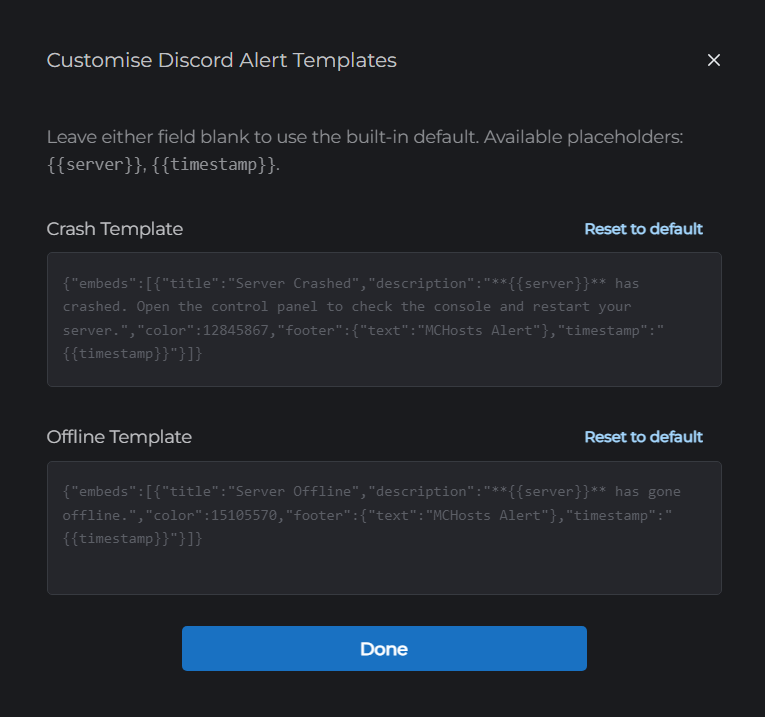
By default, Discord alerts include your server name and the time the event happened. If you want to change the message layout, click Customise Discord Templates.
Two templates appear - one for crashes and one for offline events. Both support two placeholders:
| Placeholder | Replaced with |
|---|---|
{{server}} | Your server's subdomain (e.g. cool-dragon) |
{{timestamp}} | The date and time of the event |
The template must be valid JSON matching Discord's webhook message format. If the JSON is invalid, the field turns red and the Done button is disabled until it is fixed. Click Reset to Default to restore the original template at any time.
Rate limiting
To avoid being spammed during repeated crash loops, crash notifications are sent at most once every 10 minutes per server.
← MySQL Databases | Next: Bedrock Edition →