Connecting to Your Factorio Server
Players can join your Factorio server by its address, or find it by name in the game's public browser once you've listed it. This article covers both.
Find your address and port
Open your control panel and look at the Overview page. Under Server Information you'll see Server Address, and it looks like this:
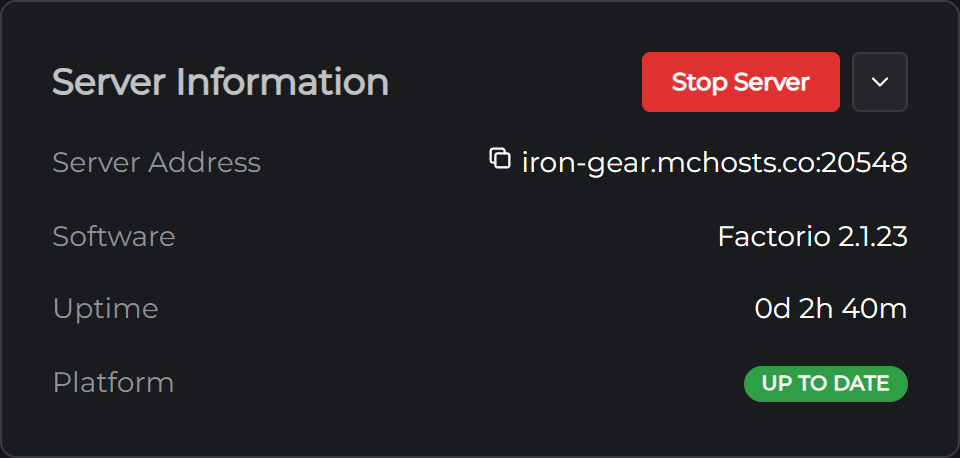
yourname.mchosts.co:20428
The number after the colon is your server's port. Every server here gets its own number so they can all share one address. Click the line to copy it.
Join by address
This works on a new server with nothing set up, and it's the way most people join a friend's server.
- Start Factorio and click Multiplayer
- Click Connect to address
- Paste your Server Address into the box, port included, and click Connect
If your server has a password, the game asks for it before it loads you in. The first time somebody joins, the game downloads the map from your server, which takes a few seconds on a new world and longer on a big one.
Find it by name in the game
If you'd rather your players search for your server than type an address, list it in the public browser.
- Open your Config tab and switch on List in the public server browser
- The first time, your server asks for your factorio.com account. Type the username and the service token from your factorio.com profile page. Wube's browser only lists servers that are signed in, and your server keeps the token to itself
- Click Save and restart your server
From then on your players click Multiplayer, then Browse public games, and type your server's name into the search box. The name is on your Config tab under Server name. Your server shows up a minute or so after it starts. Set a password if you list it, or anyone who finds it can join.
Sharing with friends
Send them your Server Address and the password if you've set one. Anyone who owns Factorio can join, whether they bought it on Steam, GOG or from Wube directly.
The password is on the Config tab, in the Server section, as Game password. New servers don't have one.
If your server has Space Age switched on, every player needs to own Space Age to join. A vanilla server takes anyone who owns the game. The switch is at the top of the Config tab, and Factorio Server Settings explains it.
Players don't need to install your mods themselves. When they join a server whose mods differ from theirs, the game offers to match them to your server's, and they're in after a short download.
If you can't connect
Your server may be off. On the Overview page, look for the Online badge. If it's offline, click Start Server. A start takes well under a minute, and the first one only a little longer while it fetches the server and makes your world.
It may still be loading. The Console tab shows Hosting game at once the server is listening, and the Online badge comes on with it.
Check the address. The game wants the whole Server Address line, number included. A different number fails the same way a server that's off does.
Check the password. It's on the Config tab, and it has to match exactly.
Check the version. Factorio only lets players join a server on exactly their version. Your server takes each Factorio update when it restarts, so if Steam has just updated the game and your friends are told the versions differ, restart your server from the Overview page and it will catch up. If it's the other way round and your server is ahead, their game needs the update.
Check Space Age. A player without Space Age is turned away from a server that has it on. Either they buy it, or you switch it off on the Config tab while the server is stopped.
Sign in to the game. Your server checks that each player is signed in to a factorio.com account, which Steam does for you. A player who skipped the sign in, or is on a copy that can't sign in, is refused. You can turn that check off on the Config tab, but it also lets pirated copies in.
Still stuck? Open a support ticket and tell us what the game said when it failed.
Next: Factorio Server Settings