How to Give Yourself OP on Your Minecraft Server
Operator (OP) status is what lets you run admin commands in-game, like changing the time, teleporting, giving items, or managing other players. This guide shows the two ways to give yourself OP on your MCHosts server.
What OP lets you do
An operator can run elevated commands directly from the in-game chat, such as /gamemode, /tp, /give, /time set, and /weather. Without OP, the server ignores these commands and tells you that you do not have permission. You give OP by Minecraft username, so make sure you have the exact spelling of the account you want to promote.
Method 1 - Use the Players tab (easiest)
This is the recommended way. You do not need the server console open, and it works whether the server is online or offline.
- Open your control panel and go to the Players tab
- Click the Ops sub-tab
- Type your exact Minecraft username into the add field
- Click Add
That is it. The change takes effect immediately, no restart required. If you are already in-game, you may need to rejoin for your new permissions to apply.
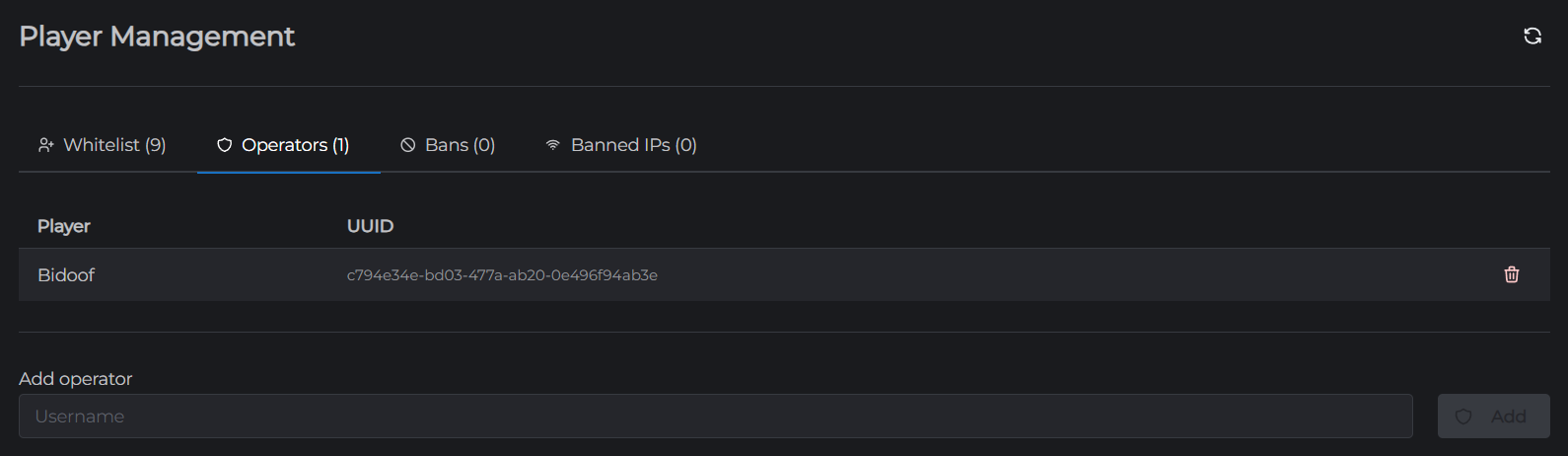
To learn what else this tab does, see Player Management.
Method 2 - Use the console
If you prefer working from the server console, you can run the op command directly.
- Go to the Console tab in your control panel
- Make sure the server is online
- Type the following, replacing the name with your own:
op YourUsername
- Press Enter
The console will confirm with a line like Made YourUsername a server operator. See Console for more on running commands this way.
Understanding op levels
By default, a new operator is given op level 4, which is full access. If you manage ops through the console or config, these are the levels:
- Level 1 - Can bypass spawn protection
- Level 2 - Can use most commands
- Level 3 - Can use more commands including
/gamemode - Level 4 - Can use every command including
/stop,/ban, and/op
Most single-owner servers never need to think about this. Level 4 is the normal choice for yourself.
Removing OP
To take OP away from an account:
- Players tab: click the trash icon next to the name in the Ops sub-tab, or
- Console: run
deop YourUsername
A quick safety note
Operators have significant control over your server, including the ability to make other players operators. Only give OP to people you fully trust, and remove it promptly if someone should no longer have it. On a public server, handing out level 4 OP to regular players is one of the most common ways servers get griefed.
Next, you might want to set up a whitelist so only approved players can join, or read Player Management for the full set of player controls.