Startup Parameters

Startup Parameters let you control the options your server's Java process starts with. Every server runs our tuned defaults out of the box, and you can switch to your own parameters whenever you want to.
Where to find it
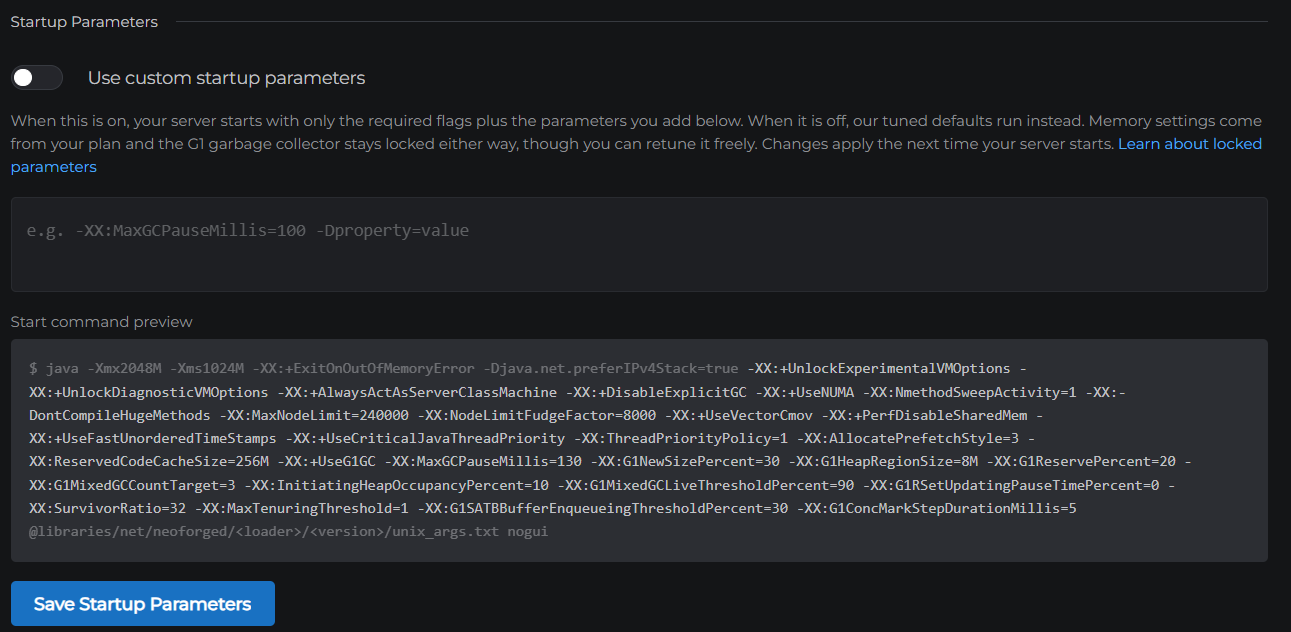
Go to Settings → Server and scroll to the Startup Parameters section. You will see a switch, a text box, and a preview of the exact command your server starts with.
The two modes
Default (switch off): Your server starts with our tuned set of performance flags. These reduce lag spikes from Java's memory cleanup and are matched to your plan size automatically. Most servers should stay here.
Custom (switch on): Your server starts with only the required flags plus whatever parameters you type into the box. This is for players who know exactly which Java options they want, for example a garbage collection tuning value or a mod's system property.
Either way, changes apply the next time your server starts.
Locked parameters
Some parameters are managed by MCHosts and cannot be changed:
-Xmxand-Xms, the memory settings. Your server's memory comes from your plan, so these are set for you. Your full plan RAM is always available to your server.- Memory percentage options like
-XX:MaxRAMPercentage, for the same reason. - The garbage collector choice. Every server runs G1, the collector Minecraft servers at these sizes perform best on. Alternatives like ZGC need far more memory to match it, so switching would make your server worse, not better. You can still tune how G1 behaves with options like
-XX:MaxGCPauseMillis.
If you try to save a locked parameter, the panel tells you which one it is instead of saving. The locked parameters are shown greyed out in the command preview, so you can always see the full picture of what your server runs.
If a custom parameter breaks your server
A mistyped option makes Java refuse to start, with the reason printed at the top of your console. Nothing is lost. Fix or remove the parameter in the box, save, and start your server again. If you want out entirely, turn the switch off and our defaults come back on the next start.
Looking for Ram Optimizations?
The old Ram Optimizations checkbox is gone. It turned our tuning flags on and off as one block, and it made your server claim all of its memory the moment it started, which kept the RAM bar on your dashboard near full even when your server was quiet. Servers now start small and grow as they actually need memory, the tuning flags run by default, and this section is where you take control when you want it.
Want the technical detail?
Curious what the default flags actually do and why they matter? See Best JVM Flags for a Minecraft Server.